Entra and Azure access, closer to your work.

PIM without
the pilgrimage.

Just-in-time access. A little less clicking around.
Your roles, accounts and tenants, right where you work.

macOS 26+ · Windows 11 · CLI for Linux, macOS & Windows

A lighter way to elevate

Your access.
Within reach.

One small app.
A little more room to focus.
Lift, the friendly blue Elevate shield mascot, presenting the app.
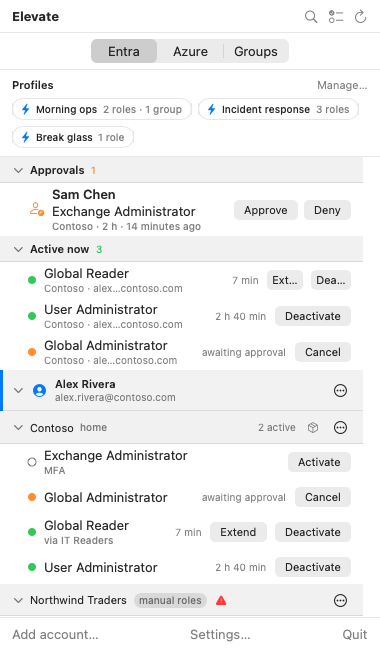
Elevate panel showing profiles, pending approvals and active Entra roles across accounts and tenants.
macOS panel · Sample data
Just enough access.Just when you need it.

“I’ll activate it for longer.
Just in case.”

When activation feels like a chore, extra access can feel convenient. Elevate makes just-in-time easier to practise, with the roles you need a click away.

Entra directory rolesAzure resource rolesPIM for Groups

Less clicking.
More doing.

From your first activation to your everyday routine. All in one familiar place.

Your roles,
within reach.

Entra roles, Azure roles and PIM for Groups across your accounts and tenants. Find what you need from your menu bar, system tray or terminal.

See active roles and pending approvals together. Search by role, tenant or account.

Find your way around
Elevate’s Entra tab with pinned profiles, approvals and roles grouped by account and tenant.
Documentation preview with sample data

Several tenants.
One activation flow.

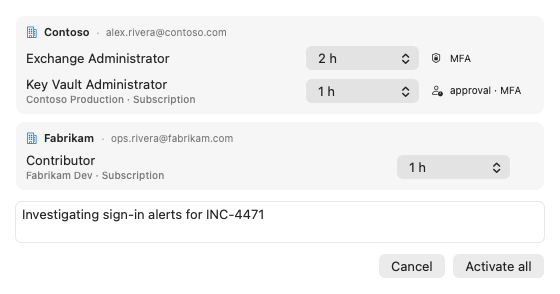
Select the roles you need across tenants and submit them together. Set durations, add a reason, and get back to the task at hand.

Each role keeps its own policy requirements, including MFA and approval.

Explore role activation
Bulk activation for Contoso and Fabrikam, with a duration for each role and a shared justification.
Documentation preview with sample data

Same task tomorrow?
There’s a profile for that.

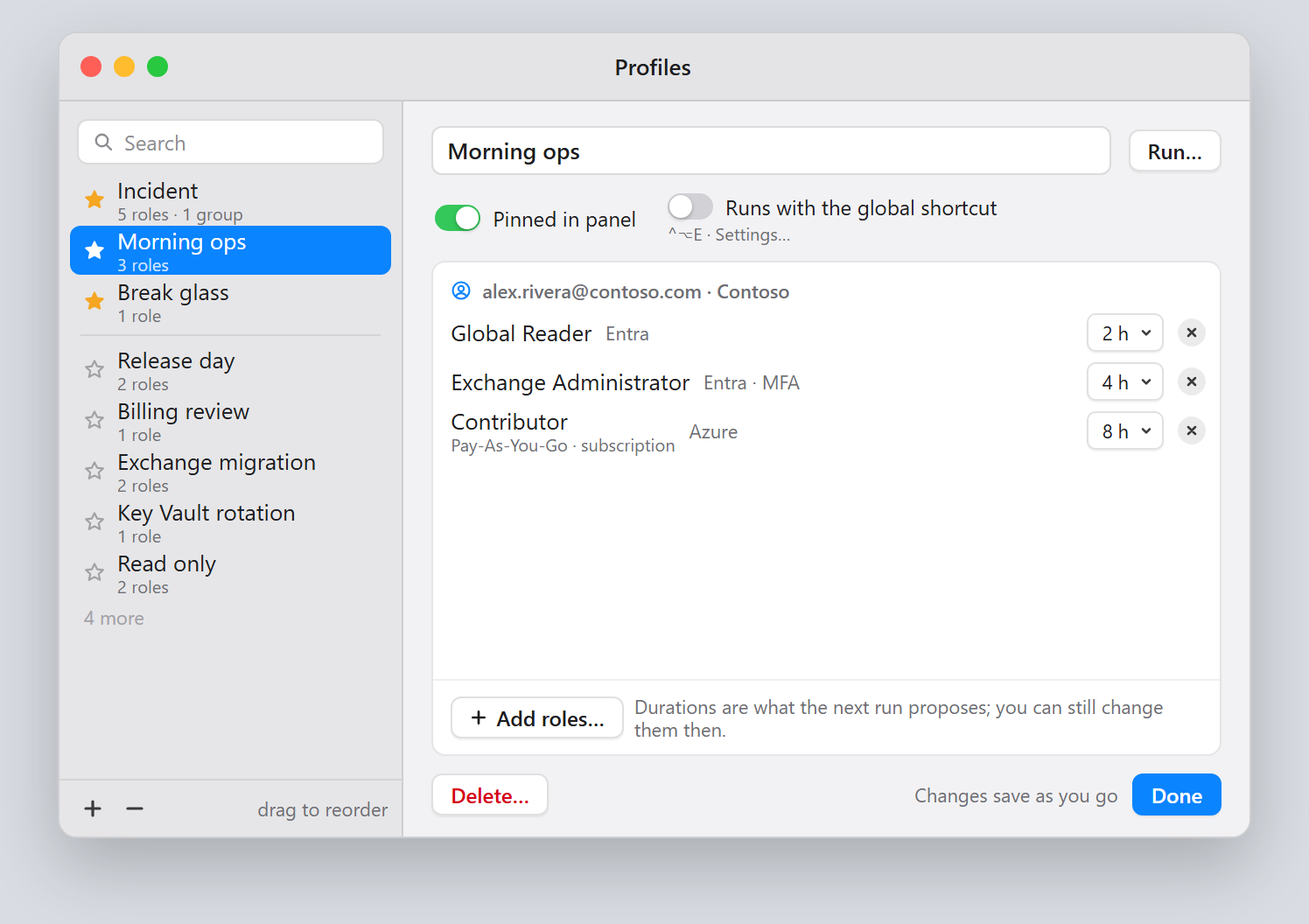
Save a role selection and reuse it. Elevate remembers reasons and durations, so your everyday setup is ready when you are.

Already active roles are skipped. Pin your favourites or run a profile with a global shortcut.

Meet profiles and shortcuts
Profiles window with Morning ops selected, showing saved Entra and Azure roles and their durations.
Documentation preview with sample data

Access packages,
too.

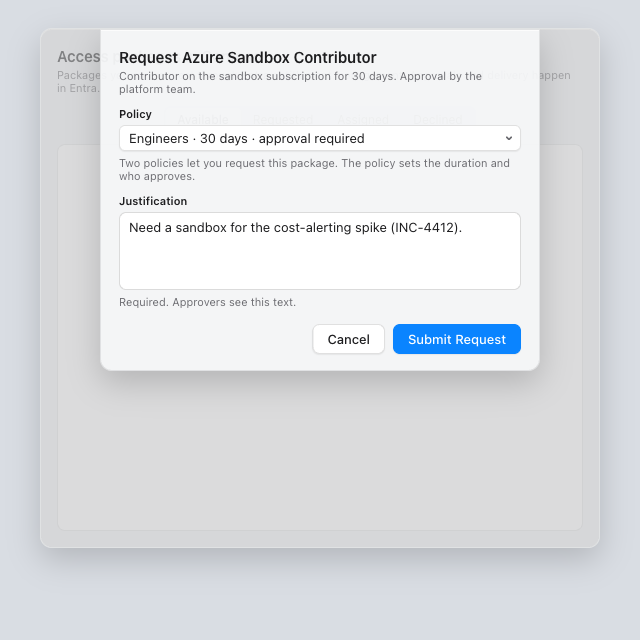
Find available packages, submit a request and follow its status from Elevate. Your self-service access stays close to the rest of your work.

Packages with extra questions open in My Access so you can complete the request there.

Explore access packages
Requesting the Azure Sandbox Contributor access package with a policy and justification.
Documentation preview with sample data

Access has
an off switch.

Live countdowns and expiry reminders help you keep track of active roles. Done early? Deactivate. Extend when the work actually needs it.

Stay on top of active access

Active now · You’re in control

Your access.
Your tenant’s rules.

Elevate works with your eligible access and your tenant’s activation requirements. Required approvals and MFA still apply.

Delegated access

Acts with your access. No app-only permissions or client secret.

Open source

Read the source. Understand the app. Make it better.

No telemetry

No analytics, crash reporting or usage tracking.

Permissions, in plain English.

Full scopes & consent details
Permission groups and how Elevate uses them
Permission group What Elevate uses it for
Read access 5 Graph scopes Show your profile, eligible roles and PIM requirements.
PIM write access 2 Graph scopes Activate and deactivate Entra roles and PIM group access.
Azure access 1 Azure scope Find Azure resources and manage your role activations.
Access packages 1 Graph scope Find, request and cancel self-service access.
The risk to manage

Write scopes are powerful. A compromised app or token could misuse your access, with greater impact for admins. Use trusted builds, a protected device and minimal access.

Elevate, ready
for your fleet.

Less setup for people.
Consistent configuration for IT.

Deploy with your tools.

Intune, Jamf, Group Policy and managed CLI configuration. One standard app per platform, without a company-specific build.

Set the essentials centrally.

Push the client ID, sign-in options and tenant settings. Lock managed settings and control update checks.

A shared starting point.

Publish ready-to-run role profiles through policy or HTTPS. Existing eligibility and PIM requirements still apply.

See what reached each device.

Settings, Diagnostics and the CLI show applied configuration and warnings. Validate templates before rollout.

Read the enterprise deployment guide

Just-in-time,
with less fuss.

A native app for your desktop. A CLI for your terminal.
Free and open source.

Windows

One click from your system tray.

Windows 11 · .NET 10 runtimeInstall for Windows Download an MSI

Current installers are unsigned. See the install guide for checksum verification.

elevate activate "Global Reader" --duration 2h --reason "Support ticket 4211"

Before your first activation

Use your own or your company’s app registration for Entra roles, groups and access packages. Azure CLI or Azure PowerShell sign-in supports Azure resource roles only.
Set up your app registration

Get up to speed.

All documentation on GitHub